
Getting Started with ZenCommunity Pro
Building an online community used to mean choosing between a clunky WordPress plugin with limited features or an expensive third-party platform that pulled your members away from your main site. ZenCommunity Pro by Kodezen changes that entirely — and once you understand what it offers, it is difficult to justify looking elsewhere.
What Is ZenCommunity Pro?
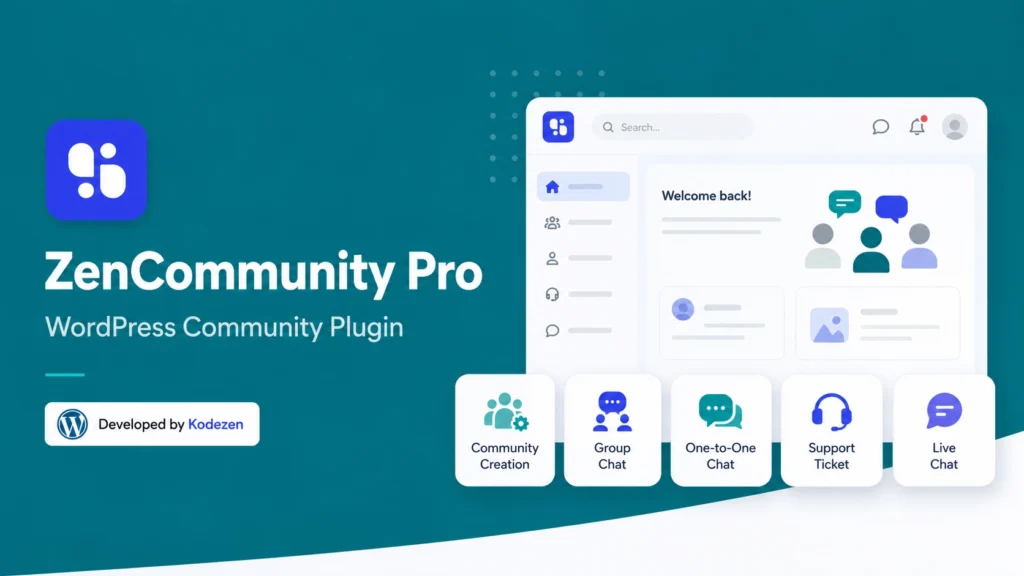
ZenCommunity Pro is the first WordPress plugin that genuinely combines community building, live chat, and support ticketing in a single, natively integrated solution. Rather than stitching together three separate tools — a forum plugin, a chat widget, and a helpdesk system — ZenCommunity Pro brings all of that functionality under one roof, inside your WordPress dashboard, without the need for external subscriptions or complex integrations.
The headline promise is simple: create, connect, and support — all in one place.
Key Features Worth Knowing From the Start
Community Creation
Real-time communication is central to any thriving community. ZenCommunity Pro includes both group chat for community-wide or topic-specific conversations and one-to-one private messaging between members. These are not bolted-on afterthoughts — they are built into the plugin’s core architecture and designed to work seamlessly alongside your community content.
Group Chat and One-to-One Messaging
Real-time communication is central to any thriving community. ZenCommunity Pro includes both group chat for community-wide or topic-specific conversations and one-to-one private messaging between members. These are not bolted-on afterthoughts — they are built into the plugin’s core architecture and designed to work seamlessly alongside your community content.
Live Chat Widget
One of ZenCommunity Pro’s most immediately useful features for business owners is its live chat widget. The widget can be embedded on any page of your WordPress site — or even across a separate subdomain — giving visitors instant access to support without leaving the page they are on. It supports instant responses, multi-session handling, and straightforward customisation to match your site’s branding.
Support Ticketing
Beyond live chat, ZenCommunity Pro includes a structured support ticket system. Visitors can convert chat conversations into tickets, your team can assign and track ticket status, and built-in analytics give you insight into response times and resolution rates. For any business that takes customer support seriously, this is a significant feature to have natively inside WordPress.
LMS Integration
If you run online courses alongside your community — whether through Academy LMS or another learning management system — ZenCommunity Pro integrates directly. This means your students can access a dedicated community space, participate in group discussions, and message instructors without ever leaving their learning environment. It is a genuinely powerful combination for course creators and educators.
Why It Has Mass Appeal
The features above are individually impressive, but what makes ZenCommunity Pro particularly compelling is the combination. Most community platforms charge separately for chat, support, and community features — often at significant monthly cost. ZenCommunity Pro consolidates all of that into a single WordPress plugin with a one-time or annual licence fee, keeping your community data on your own server, under your own control.
For membership site owners, this means no external platform to sync users with. For course creators, it means student communities that live inside the learning experience. For small business owners, it means professional-grade live chat and support without enterprise-level pricing.
There is also a mobile dimension worth noting. ZenCommunity Pro supports the creation of a dedicated community mobile app — complete with live chat, support ticket management, push notifications, and real-time analytics. For communities that want to meet their members where they are, this is a forward-thinking feature that few WordPress plugins can match.
Getting Started: What to Expect
Installation follows the standard WordPress plugin process — upload, activate, and licence. From there, the initial setup involves configuring your community spaces, setting member permissions, and customising the appearance to match your brand. Subsequent tutorials in this series will walk through each of those steps in detail, with screenshots taken from a real working installation.
The important thing to know upfront is that ZenCommunity Pro is designed with a straightforward setup experience in mind. You do not need to be a developer to get a fully functional community running. Most of the configuration happens through a clean admin interface, and the documentation provided by the Kodezen team is regularly updated and genuinely useful.
If you want to explore the blocks that power ZenCommunity’s frontend, start with our aBlocks Pro getting started guide
For best results, install ZenCommunity Pro on a dedicated subdomain to keep your community environment cleanly separated from your main site.
Ready to Get Started?
If what you have read here resonates — whether you are building a membership community, supporting an online course, or simply looking for a better way to connect with your audience — ZenCommunity Pro is worth exploring seriously.
Visit the ZenCommunity Pro website to explore the full feature set, review pricing options, and get started today. As someone who runs ZenCommunity Pro in a live production environment, I can say with confidence that it delivers on its promises.